Search engine crawlers, uptime monitors and specific tools you trust pass through cleanly. They still sit behind Cloudflare, but they are not fingerprinted or forced through JavaScript challenges.
Cloudflare at work
Cloudflare security rules in action
These screenshots are not lab tests or marketing mockups. They are real Cloudflare dashboards for ki-ki.co.uk and The Reasonable Adjustment over a normal twenty four hour period, with sensitive parts covered by the guardian kite mark. Even small sites are bombarded and a tuned ruleset quietly deals with it.
At a glance
One ordinary day of traffic across two small sites, with Cloudflare sitting in front of them.
12.7k
total requests for ki-ki.co.uk in twenty four hours
12.1k
requests mitigated at the edge for ki-ki.co.uk
16.2k
total requests for The Reasonable Adjustment
12.7k
requests mitigated at the edge for TRA
The pages stayed fast and most of this never touched the origin servers.
Real traffic, real mitigation
Below is a Cloudflare security overview for Ki-Ki. In that single day Cloudflare saw more than twelve thousand requests and actively mitigated the vast majority. Visitors saw a normal page. Most of the hostile activity was absorbed before it touched the site.
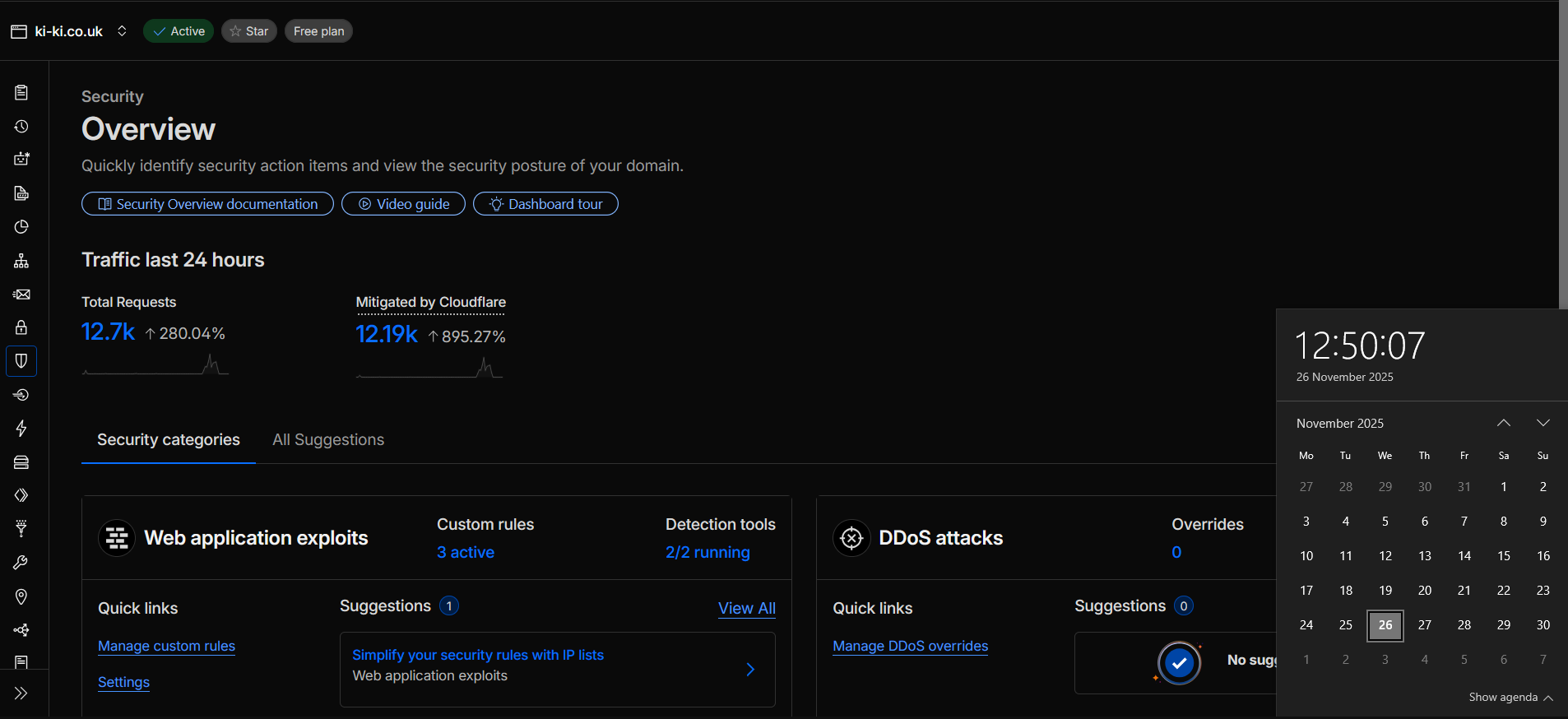
The numbers are not a brag. They show how much of an average day on the web is made up of bots, scanners, spoofed user agents and lazy credential stuffing.
Advocacy work attracts even more background traffic. The Reasonable Adjustment runs on a separate Cloudflare zone and sees its own wall of automated probes and watchers.
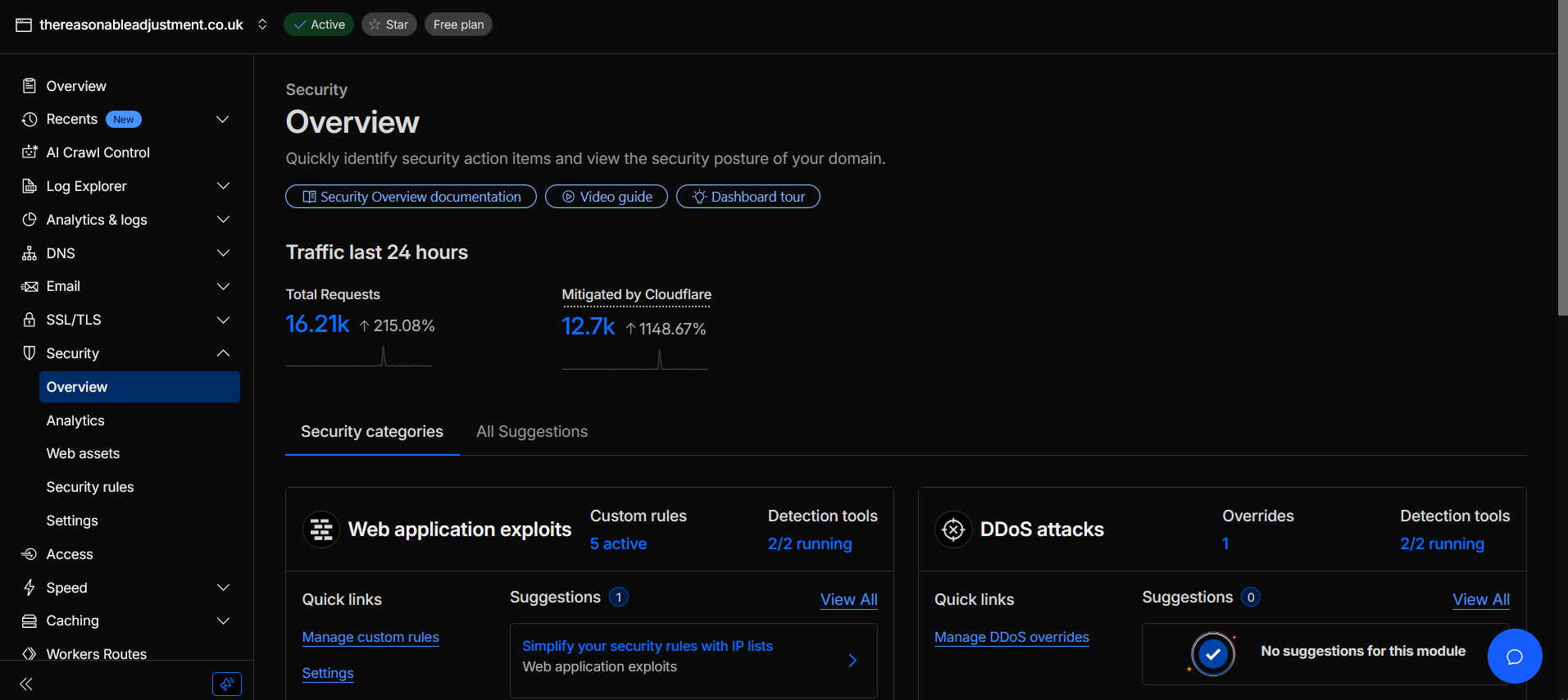
Once you see dashboards like this it is difficult to pretend small sites are ignored. They are not. The difference is whether anyone is watching the gate and whether Cloudflare has been tuned for your traffic.
What a tuned ruleset actually looks like
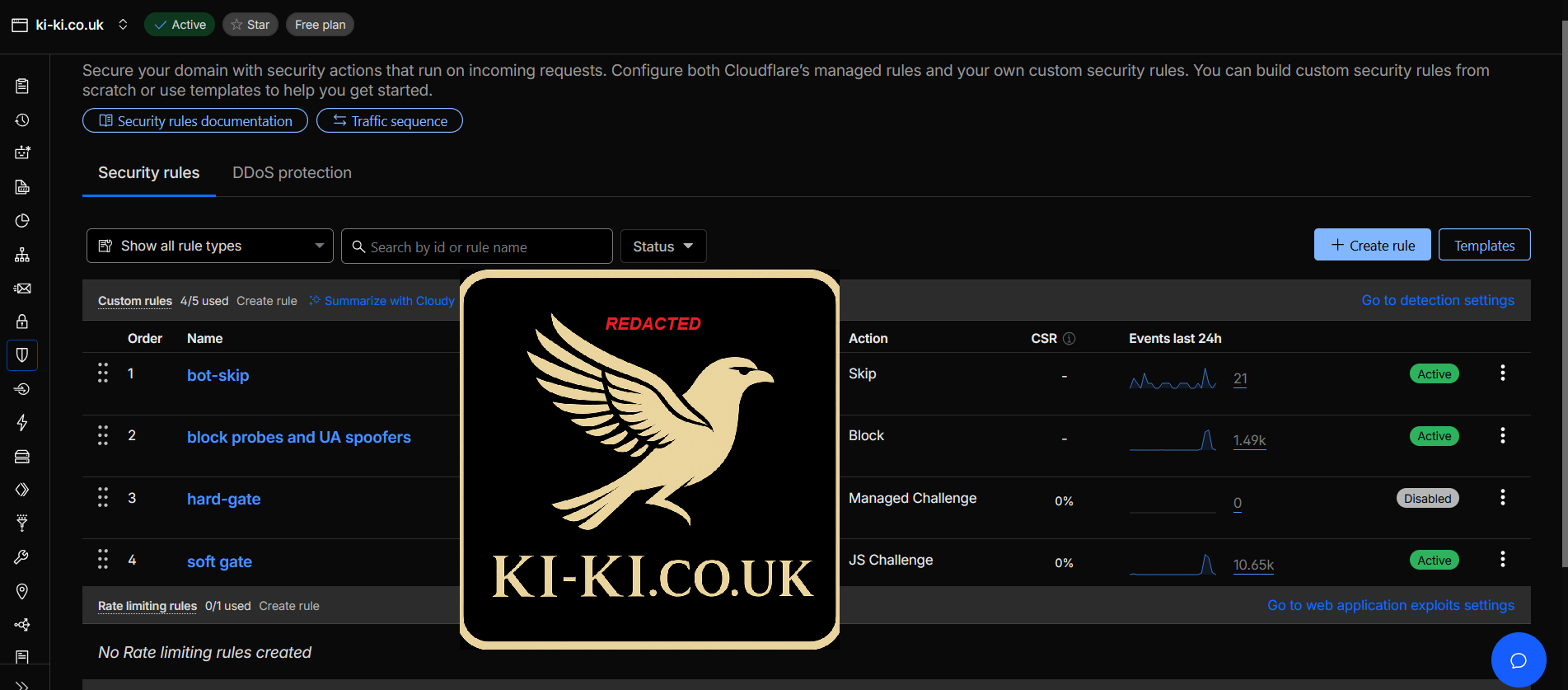
This is a redacted view of a Ki-Ki firewall ruleset. Identifiers, fingerprints and exact expressions are covered by the guardian kite mark, but the structure is fully visible.
-
Bot skip
-
Block probes and spoofers
Header mismatches, fake browser signatures, obvious vulnerability scanners and other junk are blocked at the edge. You never see the noise as error emails or sudden slow downs while a scanner runs its checklist.
-
Hard gate for suspicious networks
A small portion of the globe and a shortlist of networks generate a disproportionate amount of abuse. Traffic from those ranges hits a managed challenge. Cloudflare validates the visitor before your site is even considered.
-
Soft gate for everyone else
When something looks odd but not clearly hostile, Cloudflare serves a lightweight JavaScript challenge. Humans barely notice it. Most low grade bots fail and move on.
The result is a calmer origin server. Fewer pointless PHP executions, fewer nonsense form submissions, fewer brute force attempts against logins or control panels.
Why this level of protection is normal hygiene
This is not about paranoia. It is about not wasting time. Every unfiltered request still costs you something, whether that is CPU time, bandwidth, inbox noise or clean up hours when a spam run slips through.
- Performance your server spends more time serving real visitors and less time entertaining junk.
- Security exploit attempts are blocked at the edge instead of hitting CMS logins or admin panels.
- Clarity logs are quieter, so genuine issues are easier to spot and diagnose.
- Evidence Cloudflare keeps an audit trail of what it blocked and why, which helps if you ever need to show that you took reasonable steps to protect users.
For Ki-Ki and The Reasonable Adjustment this approach is standard. The same level of care is available to any client site that passes through Ki-Ki.
Common questions
Do I need this if I already use Cloudflare on the free plan?
The free plan is a strong base, but the defaults are cautious. They cannot know what normal looks like for your traffic without help. A tuned ruleset teaches Cloudflare what to ignore, what to challenge and what to allow straight through.
Will this slow my site down?
Properly written rules make things faster in practice. They reduce useless work for your origin, cut repeated scans and keep more of the heavy lifting on Cloudflare infrastructure.
Can I see this level of detail for my own site?
Yes. As part of a Ki-Ki build or review you get a Cloudflare dashboard for your own domain, along with a short walkthrough of what you are seeing and how to interpret the numbers.
Is this overkill for a sole trader or small charity?
No. Automated attacks do not care about your turnover. They care that your site is on the internet. Getting the basics right once is cheaper than recovering from a breach or fighting constant spam.
Want your own security overview to look like this?
If you already have a site, Ki-Ki can review your current Cloudflare setup, tighten the rules and give you a simple summary of what has changed. If you are starting from scratch, Cloudflare hardening is built into every build.
Short, focused work that makes a visible difference to risk and noise, not a never ending consultancy contract.